---
title: Duplisering
description: Ønsker du å duplisere en transaksjon?
---
[Gå til innhold](https://portal.emisoft.com/faq/duplisering#main-content)
Norsk – Norge
Vis undermeny for oversettelser
[Kontakt support](https://portal.emisoft.com/faq/kb-tickets/new?hsLang=no-no) [Kundeportal](https://portal.emisoft.com/support?hsLang=no-no)
![Emisoft Logo Vector.png\]](https://portal.emisoft.com/hs-fs/hubfs/Emisoft%20Logo%20Vector.png?height=40&name=Emisoft%20Logo%20Vector.png)
Åpne hovednavigasjon
Lukk hovednavigasjon
- Norsk – Norge
Vis undermeny for oversettelser
- [Kontakt support](https://portal.emisoft.com/faq/kb-tickets/new)
- [Kundeportal](https://portal.emisoft.com/support)
- Emisoft
Emisoft
Velkommen til FAQ
- Det finnes ingen forslag fordi søkefeltet er tomt.
1. [FAQ](https://portal.emisoft.com/faq?hsLang=no-no)
2. [GHG123](https://portal.emisoft.com/faq/ghg123?hsLang=no-no)
3. [Nyttig funksjonalitet](https://portal.emisoft.com/faq/ghg123?hsLang=no-no#nyttig-funksjonalitet)
# Duplisering
## Ønsker du å duplisere en transaksjon?
Når du legger inn større mengder data manuelt, kan det ofte være hjelpsomt å bruke Dupliserings-funksjonen i GHG123. Du lager da en transaksjon som er lik en annen transaksjon, og kan endre bare de tingene som er relevante.
#### Instruks
For å vise prosessen for duplisering, bruker vi energiforbruk som et eksempel.
Prosessen er tilsvarende for andre skjema.
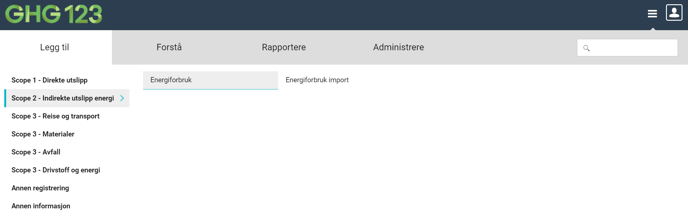
1. Klikk på Legg til --\> Scope 2 - Indirekte utslipp energi--\> Energiforbruk
2. Det neste skjermbildet viser en transaksjonsliste, altså en oversikt over registreringer som allerede ligger i systemet. Du kan se en oversikt over de ulike delene av transaksjonslisten [her](https://emisoft.atlassian.net/wiki/spaces/BRUK/pages/798162998/Manuell+registrering).
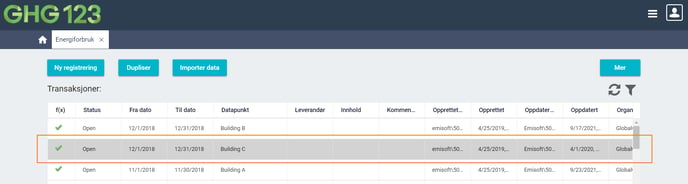
3. Velg transaksjonen du ønsker å duplisere ved å trykke på raden slik at den blir markert i grått:
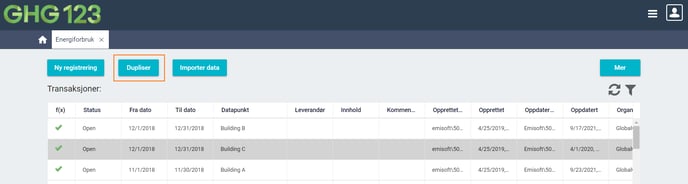
4. Trykk på knappen \[Dupliser\]:
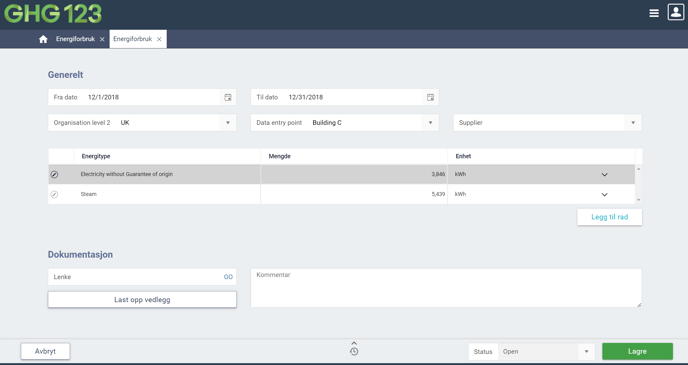
5. En duplikat av den valgte transaksjonen blir laget, og du kan gjøre justeringene som du ønsker, f.eks. periode eller mengde. Lagre transaksjonen som vanlig.

- [GHG123](https://portal.emisoft.com/faq/ghg123?hsLang=no-no#main-content)
- [Komme i gang med GHG123](https://portal.emisoft.com/faq/ghg123?hsLang=no-no#komme-i-gang-med-ghg123)
- [Nyttig funksjonalitet](https://portal.emisoft.com/faq/ghg123?hsLang=no-no#nyttig-funksjonalitet)
- [Import - legge inn større datamengder](https://portal.emisoft.com/faq/ghg123?hsLang=no-no#import-legge-inn-st%C3%B8rre-datamengder)
- [Scope 3](https://portal.emisoft.com/faq/ghg123?hsLang=no-no#scope-3)
- [Rapporter](https://portal.emisoft.com/faq/ghg123?hsLang=no-no#rapporter)
- [Utslippsmål](https://portal.emisoft.com/faq/ghg123?hsLang=no-no#utslippsm%C3%A5l)
- [Diverse](https://portal.emisoft.com/faq/ghg123?hsLang=no-no#diverse)
- [Utslippsfaktorer](https://portal.emisoft.com/faq/ghg123?hsLang=no-no#utslippsfaktorer)
- [Release notes](https://portal.emisoft.com/faq/ghg123?hsLang=no-no#release-notes)
- [Support](https://portal.emisoft.com/faq/ghg123?hsLang=no-no#support)
- [Video](https://portal.emisoft.com/faq/ghg123?hsLang=no-no#video)
- [Admin-rolle (Enterprise)](https://portal.emisoft.com/faq/ghg123?hsLang=no-no#admin-rolle-enterprise)
- [Klimaregnskap](https://portal.emisoft.com/faq/klimaregnskap?hsLang=no-no#main-content)
- [Hvordan begynne?](https://portal.emisoft.com/faq/klimaregnskap?hsLang=no-no#hvordan-begynne)
- [Data til klimaregnskap](https://portal.emisoft.com/faq/klimaregnskap?hsLang=no-no#data-til-klimaregnskap)
- [GHG-protokollen](https://portal.emisoft.com/faq/klimaregnskap?hsLang=no-no#ghg-protokollen)
- [Relevante begreper](https://portal.emisoft.com/faq/klimaregnskap?hsLang=no-no#relevante-begreper)
- [Standarder og oppslagsverk](https://portal.emisoft.com/faq/standarder-og-oppslagsverk?hsLang=no-no#main-content)
- [Science-based targets (SBTi)](https://portal.emisoft.com/faq/standarder-og-oppslagsverk?hsLang=no-no#science-based-targets-sbti)
- [CSRD](https://portal.emisoft.com/faq/standarder-og-oppslagsverk?hsLang=no-no#csrd)
- [VSME](https://portal.emisoft.com/faq/standarder-og-oppslagsverk?hsLang=no-no#vsme)
- [Miljørapportering](https://portal.emisoft.com/faq/milj%C3%B8rapportering?hsLang=no-no)
- [Sertifisering](https://portal.emisoft.com/faq/sertifisering?hsLang=no-no)
[](http://www.emisoft.com)
Opphavsrett © 2026, Emisoft AS